


MonoBoost Cancel Subscriptions
3.7175.00 Reviews
App Specs
- Version
- 1.0.24
- Updated On
- License
- Free
- Downloads
- 10,000+
- Developer
- Mnboost Corp
- Categories
- Tools
- Platform
- Android
Screenshots
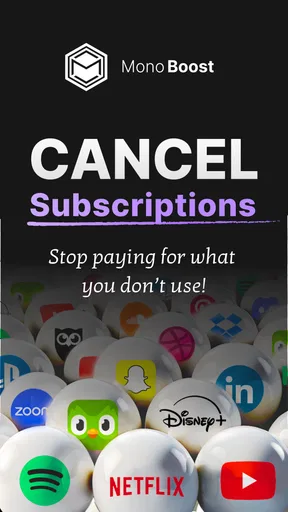
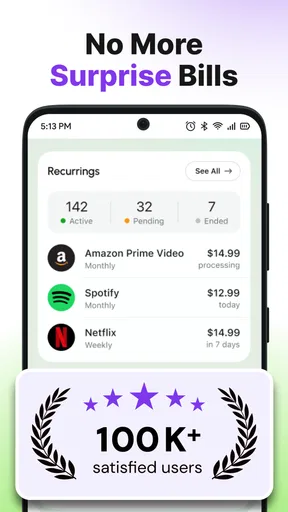
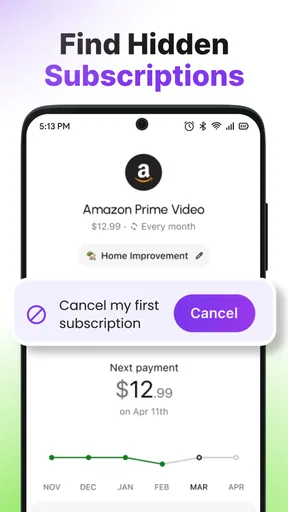
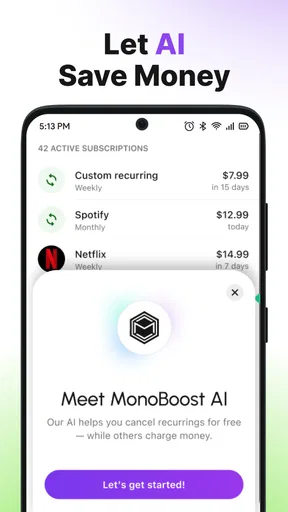
 Analysis by AppCompare
Keeping track of subscriptions sounds easy until several services renew on different days, through different app stores, cards, and payment accounts. I tested MonoBoost Cancel Subscriptions as a focused tools app from Mnboost Corp, and my impression is that it is built for one clear job: helping you see recurring services and take action before they keep charging you. The useful question is not whether every phone needs another finance tool. It is whether you want a dedicated subscription stopper rather than a general budgeting app, a spreadsheet, or manual account management.
That distinction matters. MonoBoost is free to install, carries an Everyone content rating, and is listed for devices running Android 9 or newer. Its store summary presents it as a subscription manager and stopper, while the short description is simply MonoBoost. I found that narrow purpose more appealing than an app trying to become a full bank dashboard. At the same time, a focused tool only earns its place if it makes the cancellation process clearer and easier than the usual alternatives.
How I Decided Whether MonoBoost Is Worth Using
My first decision criterion was visibility. A subscription manager should help me answer three practical questions quickly: what am I paying for, which services are still useful, and what needs attention before the next renewal? If an app merely presents a polished list without helping me act, it has not solved the main problem. MonoBoost makes sense when the goal is reducing forgotten recurring charges rather than analyzing every part of household spending.
The second criterion was control. Cancellation is rarely just a matter of pressing one obvious button. Some services are managed through a mobile store, others through a website, and some require an account page or a support request. I therefore judge a tool like this less by the promise of “stopping” subscriptions and more by how well it guides a user through the final step. A reminder or organized overview can be valuable, but it should not be confused with a guaranteed cancellation performed on the user’s behalf.
The third criterion was effort. I would not recommend a subscription app that takes so long to configure that people abandon it before entering their recurring services. MonoBoost is most attractive when it reduces mental clutter without demanding a complete financial history. If you only want to review entertainment, cloud storage, software, and membership charges, a focused manager can be more approachable than a full personal-finance platform.
I also considered the audience. Someone who already checks bank statements carefully may not need a separate manager. On the other hand, a person who has moved between phones, payment methods, or app-store accounts can easily lose track of small recurring charges. For that user, the value is not advanced investing advice or detailed spending charts. It is having one place to make a deliberate decision about services that quietly renew.
The first setup is really an audit of your habits
The best way to use MonoBoost is not to add subscriptions randomly as they come to mind. I would begin with a recent bank or card statement, then check the subscription pages inside the app stores and websites I use. This workflow exposes a common weakness in all subscription managers: no single screen can know about services paid through every possible route unless the user supplies or connects that information. Starting with statements turns the app into an organized audit instead of an incomplete memory exercise.
Worth Reading Before You Choose

EA SPORTS FC Mobile 26 Is a Bigger Football Game, but It Takes Time

Flipboard Shows What News Apps Must Do Beyond the Feed

Switching to Android Auto Means Rethinking Your Driving Routine

Google Calendar Makes a Crowded Week Easier to Manage

Ludo King Makes the Most of the Minutes Between Plans

Baby Panda World Brings Quick Play to Modern Phones, but Its Game Library Feels Busy
I would sort each recurring service into three groups while reviewing it: keep, investigate, and cancel. “Investigate” is important because a charge may belong to an annual plan, a family account, a trial that converted, or a service used by someone else in the household. Cancelling immediately can create its own problem if the service contains files, saved content, or a benefit you still need. MonoBoost is more useful when it supports a considered decision rather than encouraging cancellation for its own sake.
Where the focused approach works well
MonoBoost’s strongest idea is concentration. Instead of asking me to understand groceries, transport, income, debt, and subscriptions in one large financial interface, it keeps attention on recurring services. That makes it easier to use during a short review session. I can imagine opening it on a quiet evening, checking the services I no longer recognize, and then handling cancellations one by one while the relevant account pages are still open.
It is also a good fit for people who subscribe impulsively and remember only when a charge appears. A dedicated manager creates a prompt to review those decisions. The benefit is behavioral rather than mathematical: seeing a collection of small recurring commitments together can make their combined effect harder to ignore. Even without a complicated budget, that overview can help someone decide which services deserve another month.
Another practical strength is the separation between discovery and cancellation. I would use the app first to identify subscriptions that deserve attention, then open the official billing location for each service and confirm the result there. This two-step habit avoids a dangerous assumption that an organizer automatically has authority over every provider. It also creates a useful final check: after cancelling, I can return to the manager and mark the service according to its new status.
For households, the app can serve as a conversation starter, although it should not be treated as a shared financial ledger unless everyone agrees on how it will be maintained. One person may pay for a streaming service while another uses it, and a subscription may be billed under an old email address. Recording who owns the account and where it is billed is just as important as recording the service name. That small note-taking habit can prevent a cancellation attempt from targeting the wrong account.
A realistic use case: cleaning up after a busy year
Imagine someone who tried several productivity tools, added extra storage, started a fitness service, and accepted a few trials during a demanding year. None of the individual charges feels urgent, so the services remain active. I would use MonoBoost as a weekend cleanup tool: gather the recent statements, list every recurring item, and investigate anything that is no longer part of the person’s routine.
The key is to work in passes. In the first pass, identify unfamiliar names and match them to receipts or account emails. In the second, decide whether each service is still used. In the third, cancel through the provider and record the confirmation. This approach is safer than deleting everything that looks unnecessary, and it gives the app a concrete role in a broader process. The manager organizes the work; the provider confirms the change.
Important limits before you rely on it
I would not treat MonoBoost as proof that a subscription has ended until the original provider confirms it. App-store billing, direct website billing, and payment-card charges can follow different cancellation rules. A manager may help you locate the right service, but the final authority remains the company or store handling the payment. This is the most important limitation for anyone expecting one tap to stop every renewal.
There is also a maintenance cost. Subscription information changes. Plans are upgraded, trials expire, billing accounts move, and family members add services. Any manager becomes less reliable if it is treated as a one-time cleanup. I would schedule a short monthly review and a deeper check before major travel or a change of bank card. That routine is more valuable than filling the app once and never opening it again.
Privacy and trust should also be part of the decision. Before entering sensitive information or connecting any payment-related account, I would read the app’s current privacy and billing explanations carefully and use the least information needed for the task. If a user is uncomfortable centralizing subscription details, a local spreadsheet may be the better compromise. Convenience is not automatically worth surrendering control over financial information.
How MonoBoost Compares With the Usual Alternatives
The main alternative is manual management. Checking each provider separately gives the user the clearest control and the most direct cancellation confirmation, but it is easy to miss forgotten services. MonoBoost has the advantage when the problem is scattered attention. Manual checking wins when the subscription list is short or when the user wants to avoid maintaining another tool.
A spreadsheet sits between the two. It can include renewal dates, account owners, cancellation links, notes, and confirmation details in a format the user controls. For someone comfortable building a simple system, that flexibility may be better than a specialized app. MonoBoost is more appealing to someone who wants a ready-made place to organize the review and does not want to design columns, formulas, and reminders.
General budgeting apps are stronger when the real question is broader than subscriptions. They can help users understand categories, cash flow, and spending patterns across accounts. I would choose that category if recurring charges are only one part of a larger money-management problem. MonoBoost is the better fit when the immediate goal is specifically to find, review, and stop unwanted services without turning the process into a full financial project.
Bank and card alerts are another useful comparison. They can reveal charges as they happen and may be the best safety net for unfamiliar renewals. Their weakness is that an alert usually arrives after the transaction, while a subscription manager encourages a planned review. I would use alerts for detection and MonoBoost for organization, rather than expecting either one to replace the other completely.
Cancellation services may appear more convenient because they promise to handle the process for the user. That convenience can be attractive, but it also makes transparency and account access especially important. MonoBoost’s focused role is easier to understand when I remain responsible for confirming the cancellation. Users who want a hands-off service may prefer another category, provided they are comfortable with its terms and level of access.
What switching to MonoBoost actually costs
The download price is free, which lowers the barrier to trying it. However, the app includes in-app purchases ranging from $9.99 to $99.99 per item, so I would inspect the purchase screen carefully before committing to anything. A free installation does not automatically mean every useful capability is free. The practical cost is therefore a combination of any chosen purchase, setup time, and the discipline required to keep the information current.
There is also a switching cost for people already using a spreadsheet or budget app. Moving records means deciding which details matter: service name, billing route, renewal timing, account email, household owner, and cancellation confirmation. I would not migrate everything blindly. I would bring over only active subscriptions and unresolved charges, then keep the old record temporarily until the new system has been checked against a statement.
For someone starting from nothing, the transition is simpler but still requires careful collection. Search email receipts, inspect app-store subscriptions, and review recent statements before assuming the list is complete. This is one of the non-obvious trade-offs of a dedicated manager: it can make the ongoing review easier, but it cannot remove the initial detective work needed to discover what you actually have.
Who should use it and who should skip it
I would recommend MonoBoost to users with several recurring services, especially those who have experienced surprise renewals or regularly forget which account handles a subscription. It is also suitable for people who want a focused tools app rather than a large budgeting platform. The Everyone rating makes it broadly approachable, and the Android 9 minimum means it is aimed at relatively modern Android devices.
I would be more cautious for a user with only one or two subscriptions, excellent banking habits, or a strong preference for keeping financial records offline and entirely self-managed. That person may gain more from a calendar reminder or a small spreadsheet. I would also avoid relying on this app alone if cancellation confirmation is business-critical, such as when a service has a strict renewal deadline or stores important personal data.
The app’s current version is 1.0.24, and its listing shows an average rating of 3.7 from around 995 ratings, with roughly 175 written reviews. I read that as a reason to approach it practically rather than expect a flawless, universal solution. Its install base is over 10K, which suggests that it has found an audience, but popularity does not remove the need to verify each cancellation through the original billing provider.
My recommendation after using the workflow
MonoBoost is worth trying if your main problem is forgotten subscriptions, not general money management. I like the focused purpose because it encourages a short, concrete task: identify recurring services, decide what stays, and stop what no longer earns its place. The app is most effective when paired with statements, provider account pages, and a recurring review habit.
I would not describe it as a replacement for a bank dashboard, a budgeting system, or direct cancellation confirmation. Its value is in organizing attention and making a messy subscription list easier to work through. That is enough to justify a trial for many people, but only if they understand that the final cancellation step still deserves independent confirmation.
My practical advice is to start with a small audit rather than entering every historical service. Add the subscriptions you currently pay for, investigate unfamiliar charges, and record the billing route for each one. Before accepting any paid option, review exactly what it unlocks and whether the price fits the number of subscriptions you manage. If the app helps you complete that cleanup without adding confusion, it has earned a place in your toolkit.
For me, the clearest decision is simple: choose MonoBoost when you want a dedicated subscription stopper and an organized review process; choose a spreadsheet when control and customization matter most; choose a budgeting app when subscriptions are only one piece of a larger financial picture. Used within those limits, MonoBoost Cancel Subscriptions can turn a vague worry about recurring charges into a manageable routine.
Pros
- Quickly identifies recurring subscriptions that may be easy to overlook.
- Can help reduce unnecessary monthly and yearly expenses.
- Cancellation guidance may simplify managing multiple services.
- Useful for reviewing subscription habits in one place.
- A convenient tool for users who prefer not to contact every provider manually.
Cons
- Cancellation may still require completing steps directly with the provider.
- Results can vary depending on supported services and account information.
- Some features may require payment or an active premium plan.
- Subscription data may raise privacy concerns for cautious users.
- Incorrect or outdated billing details could lead to missed renewals.
FAQs for MonoBoost Cancel Subscriptions
What is MonoBoost Cancel Subscriptions, and what does it do?
MonoBoost Cancel Subscriptions is generally intended to help users review and manage recurring subscriptions from one place. After connecting the relevant account or entering subscription details, the service may show active plans, renewal information, and cancellation guidance. Its exact features can vary by platform and region, so check the app description carefully before downloading and confirm which subscriptions it can actually manage.
Can MonoBoost cancel every subscription automatically?
No application can always guarantee automatic cancellation for every service. MonoBoost may provide cancellation instructions, redirect you to the provider’s website, or assist with the process depending on the subscription company and your device. Some subscriptions must be canceled through Google Play, the App Store, a carrier, or the original provider. Always verify the cancellation confirmation and check that future billing has stopped.
Is MonoBoost Cancel Subscriptions free to use?
The availability of free features, trial access, and premium tools depends on the current version of MonoBoost and the store listing in your country. Subscription-management apps sometimes offer limited functionality at no cost while charging for advanced assistance or monitoring. Before starting a trial, review the price, billing frequency, renewal date, and cancellation terms shown on the payment screen.
Is my personal and payment information safe when using MonoBoost?
Before using MonoBoost, review its privacy policy, requested permissions, developer information, and data-safety details on Google Play or the App Store. Avoid sharing passwords, banking credentials, or unnecessary account access unless the service clearly explains why they are required. A trustworthy subscription tool should use secure connections and explain how data is collected, stored, shared, and deleted.
What should I do if a subscription continues charging after I use MonoBoost?
First, check whether the cancellation was completed with the original billing provider and look for a confirmation email or in-app status message. MonoBoost may only guide you through cancellation rather than process it directly. If charges continue, contact the provider, Google Play, Apple, or your payment company with the transaction details. Keep screenshots and cancellation records in case you need to request a refund.


